Important Notice: Please read all instructions carefully before filling the application form. Incomplete or incorrect applications will be rejected.
1 Eligibility Criteria
Children from the following categories are eligible to apply for admission under RTE Act 2009:
Economically Weaker Section (EWS)
Family annual income not more than 72000
Below Poverty Line (BPL)
Families holding valid BPL card
SC/ST/OBC Categories
Children belonging to SC, ST, or OBC categories
Physically Challenged
Children with disabilities (40% or more)
Orphans
Children without parents or guardians
Age Criteria
As on 31-Mar-2026:
(Age: 3 to 7 years)
Note: Child must be a resident of WEST SINGHBHUM district and should not be currently enrolled in any other school. The child's age should be between 3 to 7 years as on 31-Mar-2026 (Academic Year: 2026-27).
2 Required Documents
Please keep the following documents ready before filling the application form. All documents must be scanned and uploaded in PDF or JPG format (Max size: 2MB per document):
Child's Birth Certificate
Issued by Municipal Corporation or Gram Panchayat
Income Certificate
For EWS category (Valid for current year)
Caste Certificate
For SC/ST/OBC categories (Issued by SDO)
Residence Proof
Ration Card, Voter ID, or Aadhaar Card
Aadhaar Card
Of child and parent/guardian
Passport Size Photo
Recent colored photograph of the child
Disability Certificate
If applicable (Issued by Medical Board)
BPL Card
If applicable (Valid BPL ration card)
Tip: Keep all documents scanned and ready before starting the application. File formats accepted: PDF, JPG, JPEG. Maximum file size: 2MB.
3 Application Process
Follow these steps carefully to complete your application successfully. The application process is divided into 3 pages:
Step 1: Geo-Tagged Photo Capture (Page 1)
IMPORTANT: Before starting your application, you must take a geo-tagged photo of your home with parent/guardian and student together.
Required App: You must use GPS Map Camera app to capture the photo with accurate location coordinates.
Download GPS Map CameraSample Geo-Tagged Photo Format
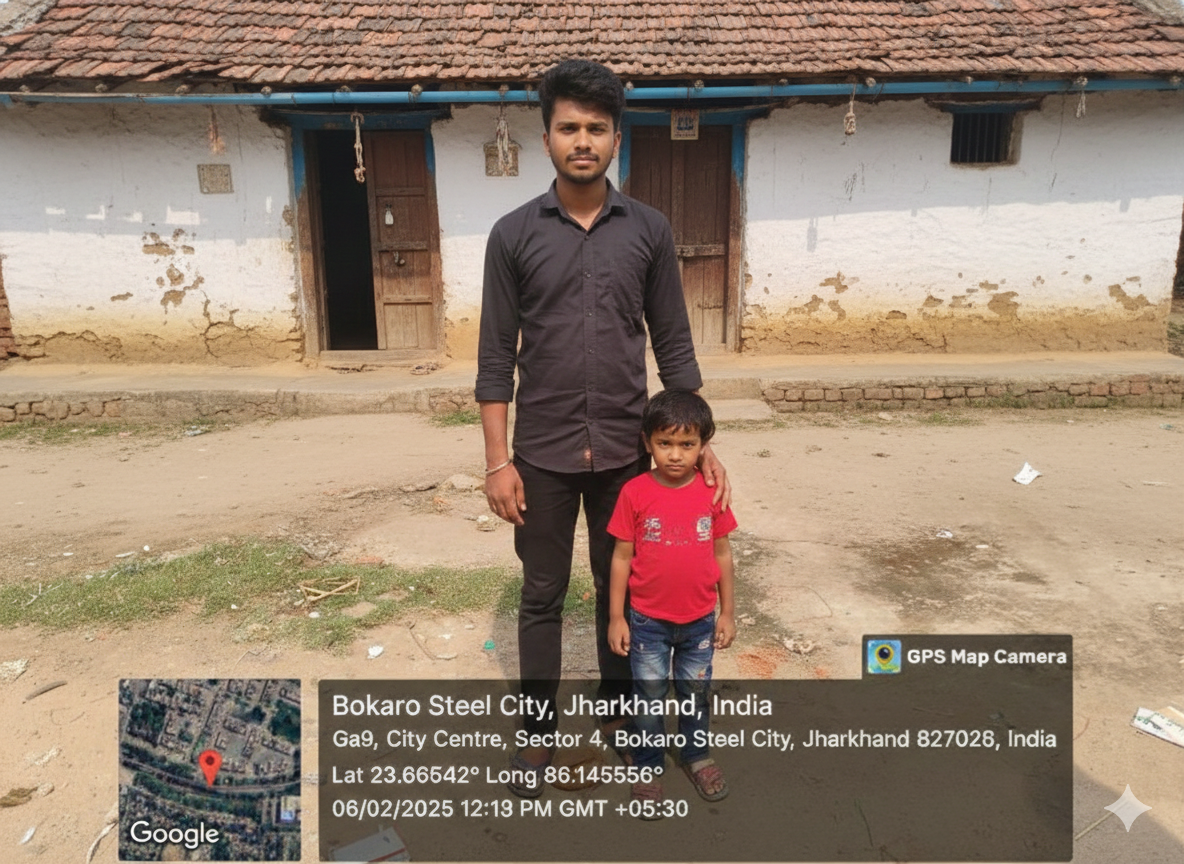
Photo must clearly show: Home entrance, parent/guardian, and student together
GPS data visible: Coordinates (Latitude & Longitude), date, time, and full address
Quality requirements: Photo should be clear, well-lit, and all faces must be recognizable
File format: JPG or JPEG, Maximum size: 2MB
Automated Distance Calculation
After you upload the geo-tagged photo, our system will automatically:
- Extract GPS coordinates from your photo's metadata
- Calculate the exact distance from your home to each school you select
- Verify schools are within permissible distance not more than 6kms
- Validate that your residential address matches the GPS location
- Show you the calculated distances before final submission
Complete the following information on Page 1:
- Upload geo-tagged photo (compulsory first step)
- Child's basic information (Full Name, Date of Birth, Gender, Aadhaar Number)
- Parent/Guardian details (Name, Relationship, Mobile Number, Email Address)
- Residential address details (House No., Street, Locality, Pin Code)
- Category selection (EWS, BPL, SC/ST/OBC, Physically Challenged, Orphan)
- Select up to 3 schools in order of preference (system will show distances)
Step 2: Document & Photo Upload (Page 2)
On the second page, you will be required to upload all necessary documents and student photograph:
Documents to Upload:
- Child's Birth Certificate (PDF/JPG, Max 2MB)
- Income Certificate / BPL Card (PDF/JPG, Max 2MB)
- Caste Certificate (if applicable) (PDF/JPG, Max 2MB)
- Residence Proof - Ration Card / Voter ID / Aadhaar (PDF/JPG, Max 2MB)
- Parent/Guardian Aadhaar Card (PDF/JPG, Max 2MB)
- Child's Aadhaar Card (PDF/JPG, Max 2MB)
- Disability Certificate (if applicable) (PDF/JPG, Max 2MB)
- Single Parent Proof - Death/Divorce Certificate (if applicable) (PDF/JPG, Max 2MB)
Student Photograph:
- Passport size photograph - Recent, colored (JPG/JPEG, Max 500KB)
Tip: Ensure all scanned documents are clear and legible. Poor quality documents may lead to rejection of your application.
Step 3: Review, Submit & Confirmation (Page 3)
On the final page, you will review all entered information and submit your application:
- Review Information: Carefully verify all details including child info, documents, and school preferences
- Declaration: Accept the terms and conditions by checking the declaration box
- Submit Application: Click the "Submit Application" button to complete your registration
After Successful Submission:
- Unique Application Number: You will receive a unique application number on screen
- Confirmation SMS: An SMS with your application number will be sent to your registered mobile number
- Confirmation Email: A detailed email confirmation will be sent to your registered email address
- Application Receipt: You can download and print your application receipt for future reference
Important: Once submitted, you CANNOT edit your application. Please verify all information carefully before submitting.
Step 4: Track Application Status
After submission, you can track your application status online using your application number:
- Visit the "Track Application" page on the website
- Enter your application number and registered mobile number
- View real-time status updates of your application
- Receive notifications for any updates via SMS and email
Note: Keep your application number safe. You will need it to track application status, for document verification, and during the admission process.
4 Important Conditions & Guidelines
General Conditions:
- Only one application per child will be accepted. Multiple applications will lead to rejection of all applications.
- Application must be submitted before the last date. Late applications will not be entertained.
- All information provided must be correct. Providing false information may lead to legal action.
- Applicants must attend the verification process with original documents when called.
- Seat allotment will be done through a computerized lottery system.
- No fees will be charged for the admission process.
School Selection Guidelines:
- You can select up to 3 schools in order of preference.
- Schools should be within 1 km radius from your residence (3 km for rural areas).
- Check the list of participating schools before making your selection.
- Seat availability varies by school. Check school capacity before applying.
Warning: Applications with incomplete information, missing documents, or incorrect category selection will be rejected without notice.
5 Before You Proceed - Checklist
Ensure You Have:
- Downloaded GPS Map Camera app for geo-tagged photo
- Taken geo-tagged photo of home with parent/guardian and student together
- Read all eligibility criteria and confirmed child's eligibility
- Collected and scanned all required documents (clear and legible)
- Prepared student's passport size photograph (recent, colored)
- Valid mobile number and email address for registration
- Selected preferred schools from the list of participating schools
- Checked document file sizes (should be less than 2MB per file)
- Stable internet connection for smooth application submission
- At least 45 minutes to complete the entire application process
Good to Go! If you have checked all items above, you are ready to proceed with the application.
6 Help & Support
If you face any issues or have questions, please contact us:
Need Help?
Email: jepwsm@gmail.com
Phone: N/A
Office Hours: 10:00 AM - 5:00 PM (Monday to Friday)
Address: RTE WEST SINGHBHUM Cell Office, DSE Office, WEST SINGHBHUM
Ready to Apply?
You have reviewed all the instructions. Click below to proceed with your RTE application.
Proceed to RegistrationBy clicking above, you confirm that you have read and understood all instructions.